PROCESS SELECTION GUIDE
CNC Machining vs 3D Printing: Which Process for Which Part?
01Subtractive vs additive: the difference in principle
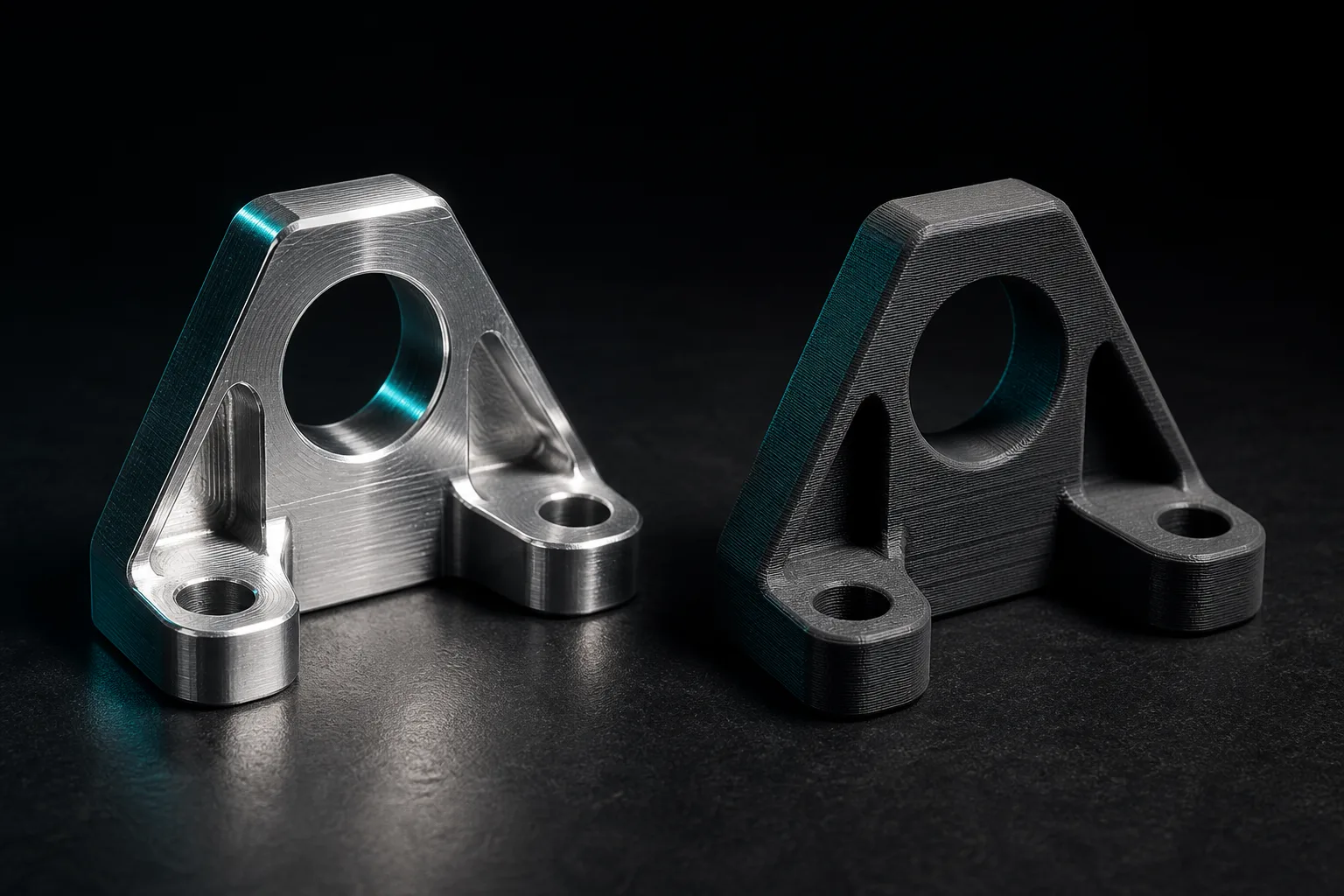
To compare CNC machining and 3D printing, you first have to return to how manufacturing engineering classifies forming methods. CNC machining is subtractive manufacturing: starting from a solid block of stock (metal or plastic), a computer-controlled cutting tool follows a programmed path to progressively remove excess material, leaving the desired shape. 3D printing is additive manufacturing: instead of removing material from stock, it builds the solid up layer by layer by melting, sintering or curing material. Manufacturing engineering textbooks treat material removal and material buildup as two major forming families, each with its own achievable geometry, material range and precision characteristics[1].
This "subtractive vs additive" divide is not an academic detail; it is the source of every selection decision. Because it cuts material away, CNC naturally lends itself to dense metal solids, good surfaces and tight tolerances, but deep pockets, internal channels or hollowed-out structures are constrained by whether the tool can reach in. Because it stacks material layer by layer, 3D printing is almost free of the "can the tool reach it" constraint and can produce hollow lattices, internal curved passages and other geometries that are hard to form by traditional machining — but the layered buildup leaves layer lines, and its material properties and strength differ from bulk stock. Once you understand this, every criterion that follows is really just an extension of this one principle.
02Decision-criteria table: seven dimensions to judge a part
Manufacturing systems theory reminds us that process selection is fundamentally a trade-off among quantity, cost, quality and flexibility; no single process is optimal on every dimension, and the key is matching the part's requirements to the process's strengths[2]. The table below organizes, qualitatively, the seven dimensions most commonly used to judge, helping you check your part against each one. It deliberately lists no specific prices or machining times, because both depend heavily on part size, material and batch, and any generalized number is easy to misread.
| Dimension | Better suited to CNC machining | Better suited to 3D printing |
|---|---|---|
| Quantity | Small-to-medium batches up to production; the more parts, the better the per-part amortization | Single parts to very small quantities; frequently revised verification parts |
| Material | Metals (aluminum, steel, stainless, titanium) and engineering plastics; ideal when bulk-material properties are required | Mostly polymers and some metals; material choice depends on the technology, with strength characteristics different from bulk stock |
| Tolerance | Stably achieves tighter dimensional tolerances; suited to mating faces and assemblies | Relatively loose tolerances; precision mating faces usually need secondary machining |
| Surface | Smooth cut faces; a good surface after finishing | Has layer lines; usually needs post-processing such as blasting or sanding to become smooth |
| Geometric complexity | Strong on external shapes and regular features; deep pockets and internal channels are limited by tool accessibility | Hollow structures, internal channels and lattices are its strong suit |
| Lead time | Stable in production once the program and stock are ready, though upfront preparation takes time | Fast to start a single prototype, but large parts and post-processing stretch it out |
| Cost structure | Includes stock and process-step costs; per-part cost drops clearly as quantity scales | Almost no surcharge for geometric complexity, but hard to amortize when parts are large or quantities high |
The way to use this table is simple: map your part's seven conditions to the left and right columns and see which side it leans toward overall. If nearly all seven point to the same column, the choice is all but settled; if the conditions pull against each other (for example, you need metal and tight tolerances, yet the part is an extremely complex internal channel), that is usually a signal for a hybrid approach or a deeper discussion with your supplier. If you want to first clarify "what CNC can actually do," read this alongside What is CNC machining.
03Two common myths: is printing always cheaper? Is CNC always slow?
Myth 1: 3D printing is always cheaper
The intuition that "printing is cheaper" comes from the experience that a single prototype needs no fixtures or program preparation. That often holds for single parts and extremely complex geometry, but cost changes direction with part size and quantity. As quantities scale up, CNC's upfront preparation cost gets amortized and per-part cost drops clearly, whereas printing spends machine time and material anew on every part, so its amortization is limited[2]. In other words, whether it is cheap depends on "how many, how big, what material," not on the process itself. Estimating a production part with the logic of a prototype tends to underestimate the cost of 3D printing at volume.
Myth 2: CNC is always slower
Another common impression is that "CNC needs programming and tool touch-off, so it's slow." This conflates upfront preparation with per-part output. CNC's upfront preparation (process planning, tool selection, program verification) does take time — which is exactly why manufacturing engineering textbooks stress that machining quality and cost depend heavily on preparation before the machine runs[1] — but once preparation is done, the per-part cycle in production is quite stable and predictable. 3D printing, by contrast, starts quickly, yet the buildup time for large parts and the post-processing (support removal, sanding, surface treatment) can be considerable too. Fast versus slow depends on "which stage you are comparing and how many parts you are making," not on a fixed label stuck on the process. That is also why how CNC machining cost is calculated looks at preparation cost and per-part cost separately.
04Hybrid strategies: prototypes, production and jigs
Treating CNC and 3D printing as mutually exclusive options actually misses the most pragmatic approach. The manufacturing-systems view encourages flexibly combining processes according to the needs of each product-lifecycle stage to achieve the overall optimum[2]. There are three common hybrid combinations:
- Printed prototypes → CNC production: Early in the design, use 3D printing to quickly make appearance parts and validate ergonomics and assembly, at low revision cost and fast iteration; once the design is locked, move to CNC to produce metal functional parts and production parts, gaining material strength, tolerance and surface quality. This is the most typical division of labor in hardware development.
- Print the jigs, CNC the products: Use 3D printing for locating jigs, gauges or soft jaws — custom-shaped, low-quantity aids that do not need metal strength, landing squarely in printing's sweet spot; the actual product parts go to CNC.
- Hybrid forming: For particularly complex parts, first print a near-net-shape blank, then use CNC to finish the critical mating faces, combining complex geometry with precise tolerances.
The shared logic of hybrids is to let each stage and each type of aid use the process best suited to it, rather than forcing a single process to do what it is bad at just for the sake of "uniformity." For small-batch teams that need to iterate quickly, this division of labor is especially valuable; for further reading, see how to do low-volume machining.
05How to decide? A line of reasoning that lets the part speak
Back to the original question: which process for which part? The answer is not to pick a side, but to let the part speak. Before requesting a quote or opening a project, first write out the part's seven conditions clearly: expected quantity, material requirements, critical tolerances, surface needs, geometric complexity, lead time and an acceptable cost structure. With that list in hand, compare it against the decision-criteria table in section 2, and the more suitable direction emerges quickly for most parts.
When the conditions pull against each other and a decision is hard to reach, that is usually precisely the moment for a hybrid strategy or a discussion with your supplier — not a flaw in the process, but the part's own complexity reminding you that you need a combined solution. Whichever path you end up taking, stating the part's conditions clearly first makes quotes more accurate, communication faster, and it easier for design and machining to align. CNC and 3D printing were never enemies; they are two tools in the toolbox, each with its specialty. Pick the right one, and the part gets made both correctly and economically.
06FAQ
What is the most fundamental difference between CNC machining and 3D printing?
The fundamental difference is the direction in which material is added or removed. CNC is subtractive manufacturing, cutting excess material away from solid stock to form the part; 3D printing is additive manufacturing, stacking material layer by layer into a shape. This difference determines how they diverge on material, achievable geometry, surface and cost structure, and it is the starting point for every selection decision.
Is 3D printing always cheaper and faster than CNC?
Not necessarily. 3D printing is often more economical for single parts and extremely complex geometry; but when quantities scale up, or you need metal, tight tolerances or a good surface, CNC usually wins on per-part cost and quality consistency. Fast versus slow also depends on part size and post-processing, so there is no one-size-fits-all answer — you have to judge by the part's actual conditions.
Can I use 3D printing and CNC together?
Yes, and it is very common. A typical approach is to use 3D printing for appearance parts or assembly-verification prototypes, then move to CNC to produce functional parts once the design is locked; you can also print jigs and gauges used in CNC machining. The two processes complement each other's weaknesses, and combining them is often more cost- and lead-time-effective than insisting on a single process.
What questions should I ask first when choosing a process?
Start by clarifying seven things: quantity, material, critical tolerances, surface needs, geometric complexity, lead time and an acceptable cost structure. Once you list the conditions and compare them against the decision-criteria table, the more suitable process emerges quickly for most parts; if the conditions pull against each other, that usually signals a part suited to a hybrid approach or worth discussing with your supplier.
Get notified when new articles and video guides go live — no inbox flooding, one-click unsubscribe. (newsletter in Chinese)
READY TO MOVE ON THE CNC PARTS?
Part confirmed for CNC? Hand the machining prep to AI to speed it up
From drawing-to-3D conversion and G-code generation based on your shop's tool library to cutting simulation and dimensional cross-verification, we help you do the pre-machine preparation faster and with fewer errors.
Contact an onboarding advisor Training courses07References
- Kalpakjian, S., & Schmid, S. R. (2020). Manufacturing Engineering and Technology (8th ed.). Pearson.
- Chryssolouris, G. (2006). Manufacturing Systems: Theory and Practice (2nd ed.). Springer.